How to use preload key requests
When aiming to improve the speed of your WordPress site using WP-Optimize, one of the features of WP-Optimize Premium is the ability to preload key requests.
How does it work?
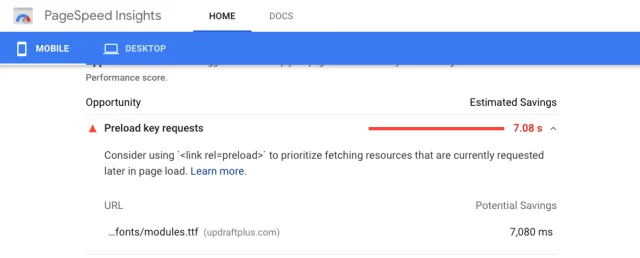
Preload key works by using an audit to identify which resources to preload on your WordPress site. The browser will then preload resources so they are available immediately when needed, preventing eventual waiting time later on, making your site load faster. Google’s pagespeed insights will often suggest preloading the requests to font files and other assets as a speed improvement:
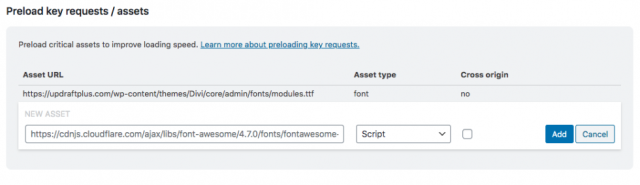
With WP-Optimize Premium you have the ability to manually add any resource you want to be preloaded:
As can be seen in the Google PageSpeed insight test, preloading key requests can result in massive time savings when visitors are loading your site.
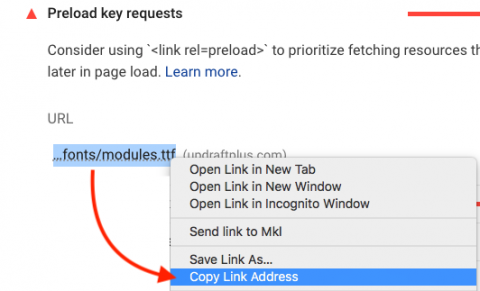
In order to get the URL to add to WP-Optimize, just right click on the resource and copy the URL:
Next, past the URL in the ‘New Asset’ box of the ‘Preload key requests / assets’ section of WP-Optimize and press ‘Add’.
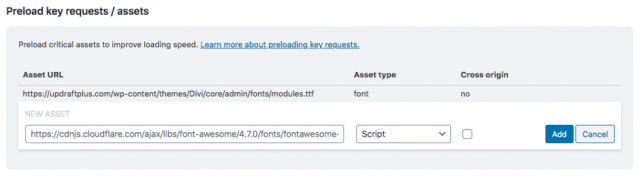
The URL you added you will be added to your preload key requests.