How to exclude individual CSS files from minification
You can completely disable the merging and minification of all your CSS files by following these steps:
- Go to WP-Optimize > Minify > CSS
- Click ‘Process CSS files’:
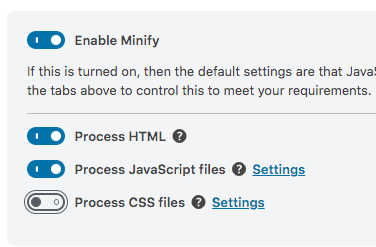
Your CSS files will neither be minified nor merged. You can enable the minification and merging of your CSS files simply by clicking it again.
Note: If you wish to load CSS files asynchronously, you should keep this setting enabled, and disable minification and merging in the CSS settings.